How to View Category-Based Sales Report on Merchant Portal?
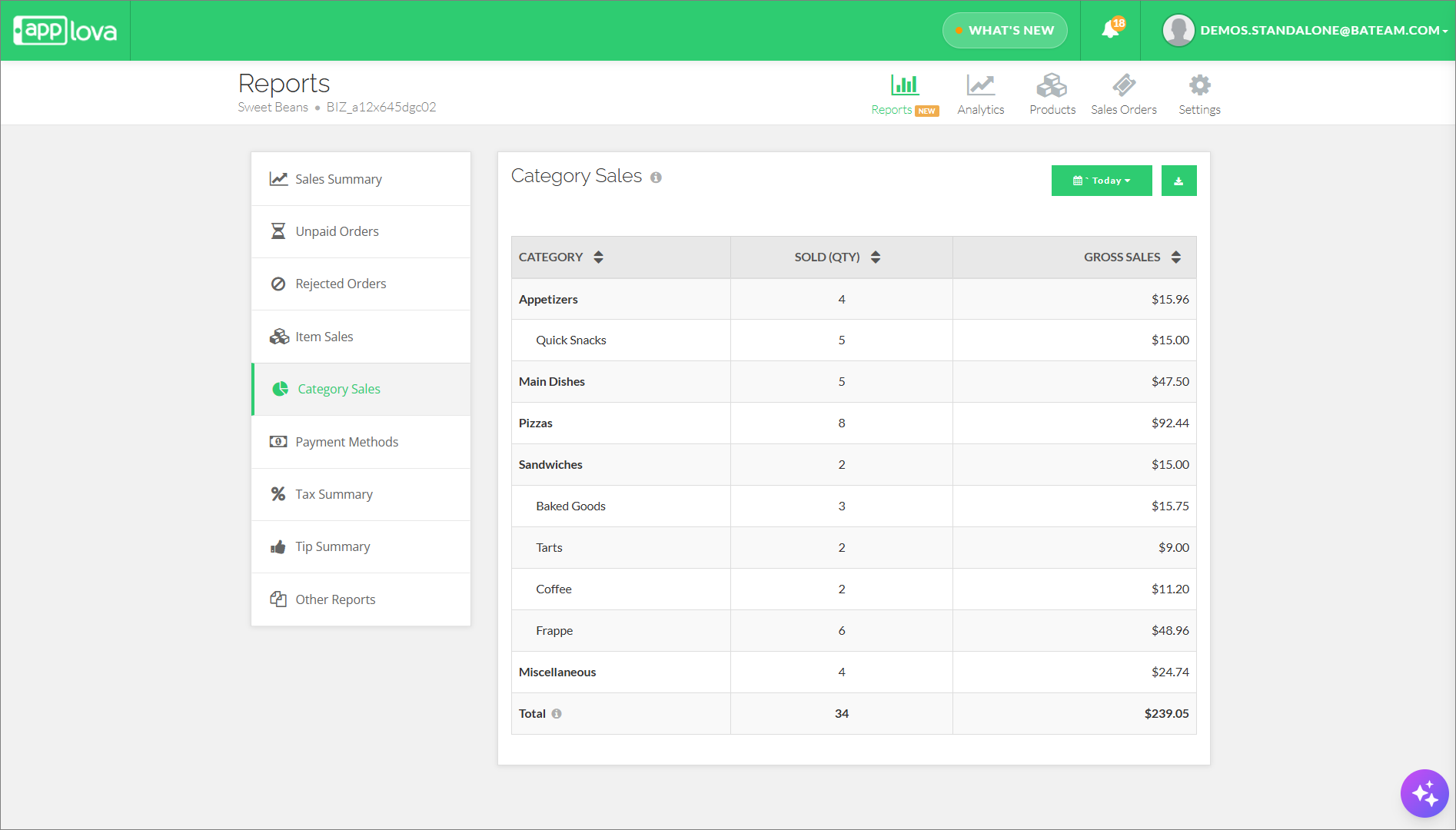
This report summarizes sales by product category instead of individual items, using a hierarchy of Main Category → Sub-Categories. It shows the Category Name, Quantity Sold, and Total Sales for each category, making it easier to spot top-performing categories, understand demand, and support decisions on menus, promotions, and inventory. Products without an assigned category are grouped under "Miscellaneous".

Use Case Scenario
When a product is linked to both a main category and a sub-category, its sales amount will be shown under each assigned category in the report. However, in the overall revenue total, that sale is counted only once, so there is no double counting.
Example:
If Fries is assigned to both Category 01 (Main Category) and Category 02 (Sub-Category), a sale of Fries will appear in both categories.
Still, the overall total revenue will include that sale only once.

If the "Miscellaneous" Category has been:
- Hidden
- Renamed
The report will automatically respect those existing settings.
Related Articles
How to Deactivate the Miscellaneous Category from the Webstore?
How to Deactivate the Miscellaneous Category from the Webstore?
Related Articles
Enhanced Reports on Merchant Web Portal?
This feature allows merchants to view detailed Reports from the Merchant Portal. Sales Summary - Provides an overview of total sales, order count, discounts, refunds, taxes, tips, and net sales for the selected time period. Unpaid Orders - Displays a ...How to View Summary Reports via Merchant Web Portal?
This feature is currently available only for Round1 merchants. This feature allows merchants to view summary reports. There are two categories of summary reports that can be viewed via the Merchant Web Portal. Real-Time Reports Daily Payment Method ...How to Filter Reports by Revenue Centers?
When Revenue Centers are set up, merchants can filter reports based on the revenue center. This helps track sales performance by specific ordering points such as individual Kiosks or POS registers. Step 1 Login to the Merchant Web Portal. Step 2 ...AI-Curated Cross-Sell Suggestions via Merchant Portal
This feature helps merchants boost sales by using AI to suggest complementary products through cross-sell recommendations directly in the Merchant Portal. What is Cross-Sell? Cross-sell is the practice of recommending additional products that are ...Download an Enhanced Sales Order CSV with Gross and Net Sales Columns
Supported Domains: Standalone This feature enhances the Sales Order CSV Export by introducing an additional checkbox that allows merchants to include detailed financial insights such as Gross Sales, Net Sales, and Refunds breakdown. With this update, ...