How to Manage Online Ordering or Webstore Brand Settings via Merchant Web?
This guide explains how to manage the Online Webstore settings through Applova Merchant Web. Merchants can download the webstore QR code, copy and share the webstore URL, upload a banner image, and add a message to the webstore homepage.
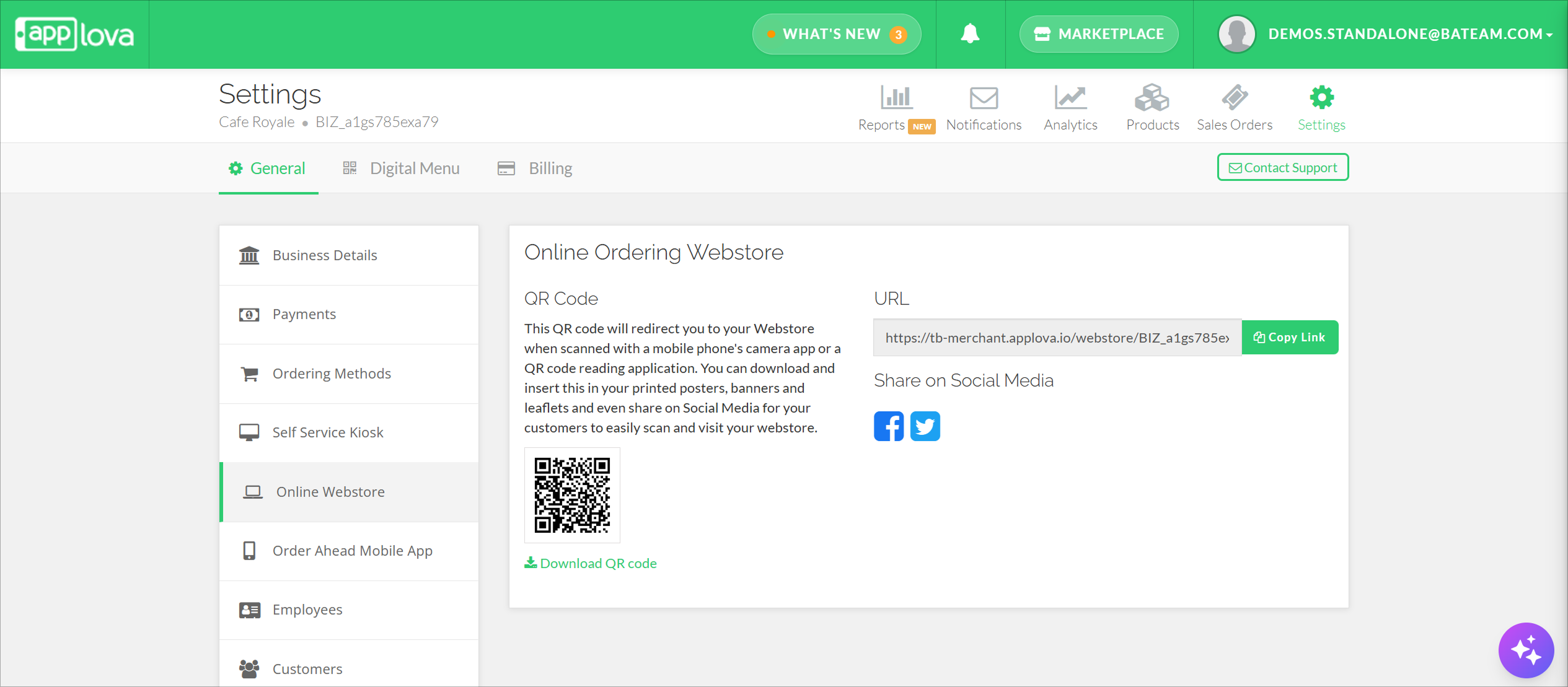
Downloading QR Code
The QR code can be downloaded and included in your banners, leaflets, posters or on social media platforms.
Step 1
Login to "Applova Merchant Web".
Step 2
Click "Settings" and go to "General" tab.
Step 3
Click "Online Webstore".
Step 4
Click on "Download QR Code" and select the preferred format.
URL for Easy Access
Step 1
Login to "Applova Merchant Web".
Step 2
Click "Settings" and go to "General" tab.
Step 3
Click "Online Webstore".
Step 4
Click on "Copy Link" to copy the URL.
Sharing on Social Media
Step 1
Login to "Applova Merchant Web".
Step 2
Click "Settings" and go to "General" tab.
Step 3
Click "Online Webstore".
Step 4
Click on the social media icons to share the URL of your webstore in the respective social media platforms.
Related Articles
How to Manage Your Digital Menu via Merchant Portal?
The Digital Menu settings in the Merchant Portal provide merchants with a central place to manage how their menu is presented and shared with customers. These settings help merchants improve the overall digital menu experience while keeping the ...How to Configure Order Pick Up Via Merchant Web?
Merchants can configure order pickup settings through Merchant Web. These settings allow merchants to manage pickup related details, and ensure customers can place pickup orders based on the business’s preferred setup. How to Enable Pick Up Option? ...How to Configure Order Delivery Via Merchant Web?
Merchants can configure order delivery settings through Merchant Web. These settings allow merchants to manage delivery related details, and ensure customers can place delivery orders based on the business’s preferred setup. How to Enable the ...How to Change Order Statuses via Merchant Portal?
This feature allows merchants to update an order’s status throughout the order lifecycle, such as New, Accepted, Ready, Completed, Void, or Rejected. This helps merchants clearly track order progress and manage each order based on its current stage. ...How to Manage Self-Service Kiosk via Merchant Portal?
With this feature merchants can manage their Self-Service Kiosk settings through the Merchant Portal. These settings help merchants configure kiosk-related options and control how the kiosk is displayed or used by customers. How to View Activated ...