How to Display Calories on the Product List Page of the Webstore V3?
By using this feature, merchants can display a product’s calorie count directly on the product card as a clear label. This helps customers quickly view calorie information while browsing the menu and make more informed ordering decisions.

The calorie label will only display calorie information. If other nutritional details are configured for a product, they will not appear on the Product List page. To learn how to configure calorie values, follow the steps in the related article on configuring nutritional information;
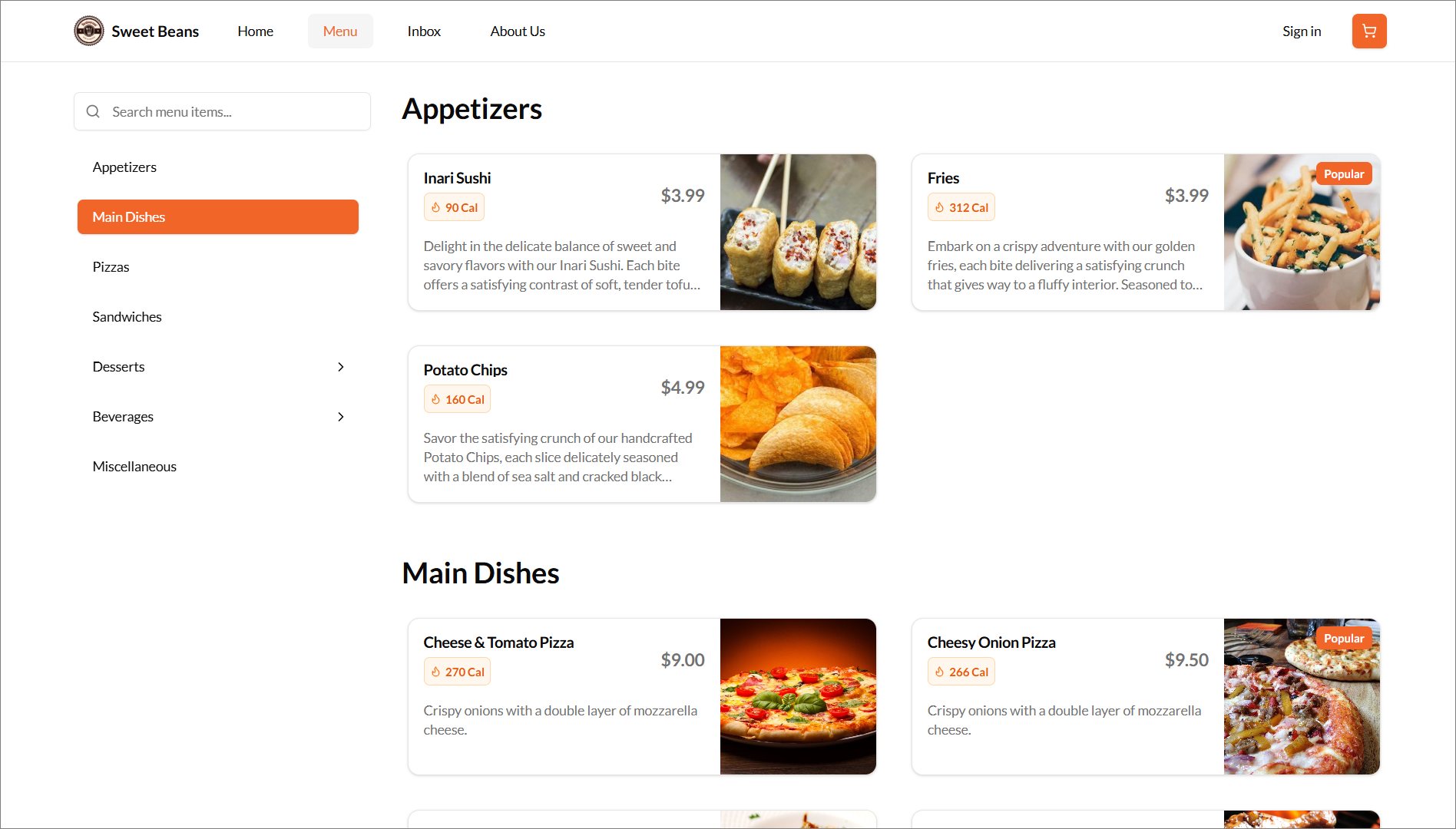
When a customer opens the Webstore and navigates to the Menu page, they will see the available products displayed as product cards. If calorie information has been added for a product, a small orange calorie label will appear on that product card. This label allows customers to quickly view the calorie count of each menu item while browsing the menu.
How it Reflects?
Related Articles
How to Add Nutritional Information of Products on Merchant Web?
How to Add Nutritional Information of Products on Merchant Web?
Related Articles
How to Disable the Promo List View on Webstore V3
Do not share this guide with merchants Supported On: Webstore V3 This feature allows support to disable the "View Available Promotions" option on the webstore v3 checkout page when a merchant does not want customers to view available promotions. How ...Top Sellers on Webstore V3
The Top Sellers feature on the Webstore highlights a restaurant’s most frequently purchased items. This allows customers to quickly identify and order trending products without needing to browse through the entire menu. By automatically showcasing ...Building an Effective Webstore: Webstore V3 Layout Options
Webstore V3 provides restaurants with a modern, flexible online storefront. Each section is designed to highlight food, share the brand story, and guide customers toward placing orders. The following overview presents all available layout options and ...Product Recommendations on Webstore V3
This feature allows the merchants to suggest products to customers when they place orders for specific items. Types of Product Recommendations There are two types of product recommendations. 1. Cross-Sell 2. Upsell What is Cross-Sell? Cross-sell is ...Smart Product Recommendations on Webstore V3
This is a default feature available only for registered customers. Smart Picks brings a personalized ordering experience by using AI to highlight products they’re most likely to enjoy based on their past purchase history. This feature helps repeat ...