Restricting Promo Codes to Specific Customer Email Addresses
This feature allows merchants to restrict a promotion so that only selected email addresses are eligible to receive the discount. By specifying exact email addresses, merchants can prevent unauthorized users from redeeming the promotion.

Usecase Scenario
HealthyLife Pharmacy runs a promotion offering 100% off wellness consultation bookings for registered physicians. To prevent misuse, the merchant uploads a list of verified physician email addresses into the promotion settings. When a physician logs in using an approved email address and proceeds to checkout, the promotion is applied automatically.
If a user attempts to redeem the promotion with an email address that is not on the approved list, the discount will not be applied. This ensures the promotion remains exclusive to the intended audience.
How to Configure Specific Customer Email Addresses via Merchant Portal?
Step 1
Login to "Applova Merchant Portal".
Step 2
Navigate to the "Settings" tab and then proceed to the "Plugins" section.
Step 3
Click on the "Promo Codes" plugin and you'll be led to a new page called "Manage Promo Codes"
Step 4
Create a new promo code or select an existing one to edit.
Create a new promo code or select an existing one to edit.
Step 5
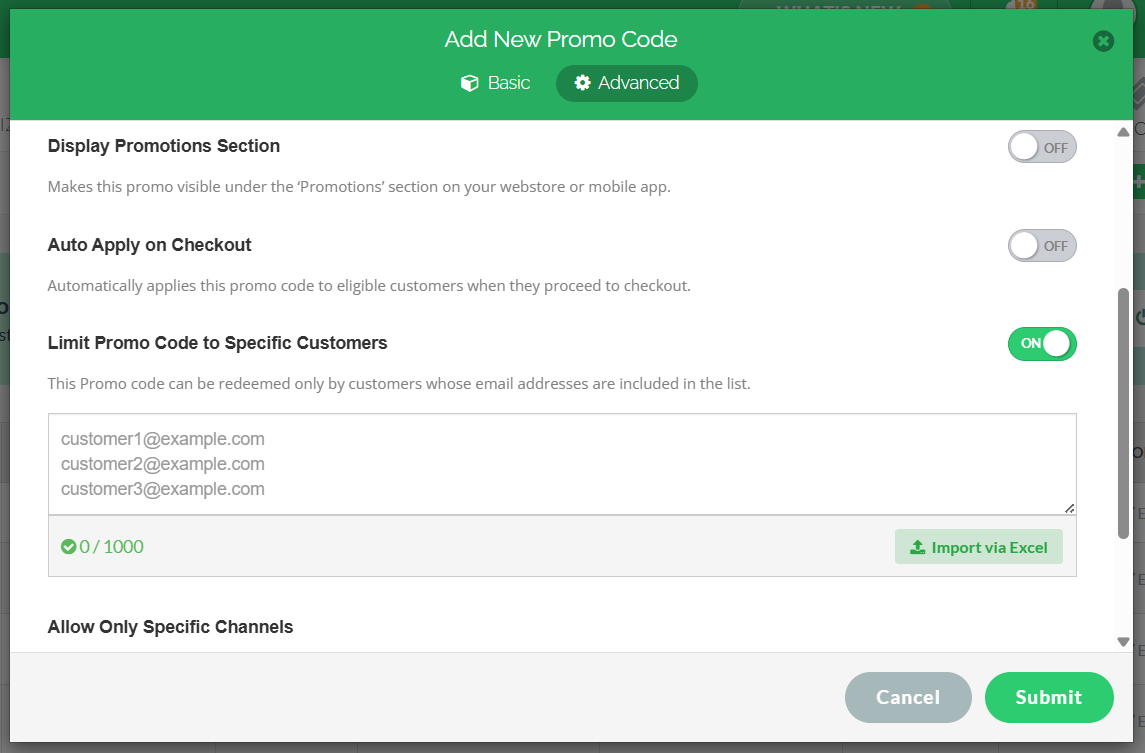
In the promo code window, click on the Advanced tab and toggle “Limit Promo Code to Specific Customers” ON.
Step 6
In the promo code window, click on the Advanced tab and toggle “Limit Promo Code to Specific Customers” ON.
Step 6
In the provided text field, enter one or more allowed email addresses, or upload an Excel file containing the list of email addresses

When entering the email addresses in the text field, ensure each email address is entered on a separate line.
Click on "Submit" to save the promo code configuration.
Related Articles
Related Articles
Managing Order Level Promo Codes
This feature allows the merchant to add a promo discount for the whole order. A promotion can be added as a percentage and a flat amount as well. Promo code feature is enabled by default Note:Promo Codes can also be activated through the Applova ...How to Configure Promo Codes for Specific Channels via Merchant Portal?
This feature allows merchants to control which sales channels (POS/ Kiosk/ Webstore/ Mobile App/ Digital Dining) accept specific promo codes. By enabling or disabling channels, merchants can tailor promotions to the platforms that best fit their ...How to Show Promo Codes in the Webstore Promo List View
The promo list view feature on the Webstore checkout page allows customers to browse and apply available promotions without needing to manually enter promo codes. This improves the ordering experience by making discounts more visible and accessible. ...Managing Product Level Promo Codes
This feature allows the merchant to add promo discount for a selected product. Promo code feature is enabled by default Note: Promo Codes can also be activated through the Applova Marketplace aswell. Once activated, Promo Codes will be enabled as a ...How to Auto-Apply Promo Codes on the Merchant Portal
Normally, customers must enter a promo code during checkout to receive a discount, but now with the auto-apply feature, eligible promotions are now applied automatically when the order meets the configured conditions, removing the need for manual ...