Displaying Dynamic Fields on Webstore V3
Business Dynamic Fields introduce a flexible way for merchants to capture and manage custom information within their digital storefront. Instead of relying solely on predefined system fields, this feature allows merchants to create their own data inputs tailored to the specific operational, branding, or configuration needs of their business.
By enabling merchants to define custom fields—then easily show, hide, or update them as their processes evolve—Business Dynamic Fields eliminate the need for platform-level customization. This adaptability ensures the Webstore interface can reflect each business’s unique requirements

Example:
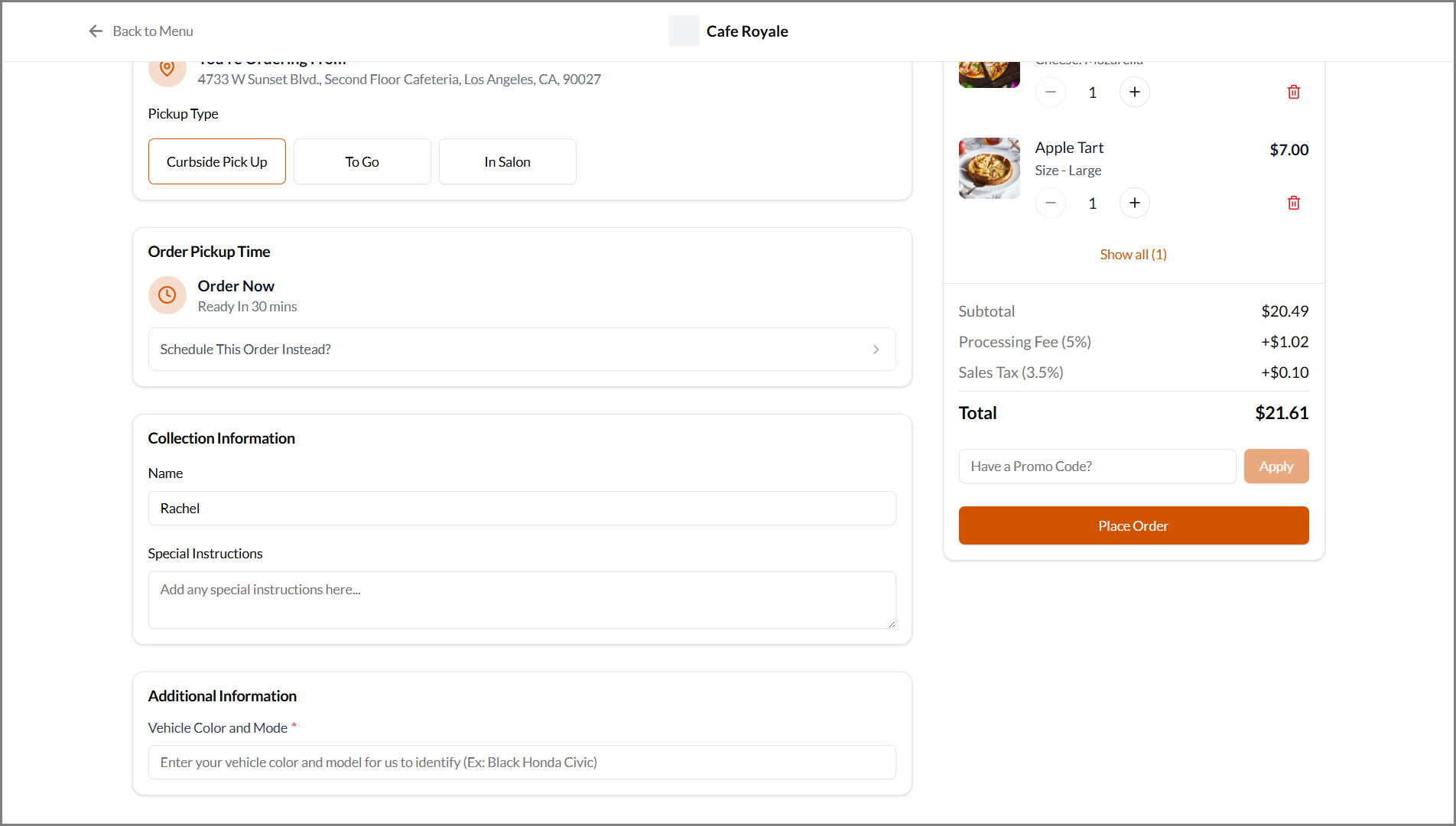
During a curbside order, customers can be prompted to specify their vehicle color and model, helping staff accurately deliver the order to the right individual.
How it Reflects on the Webstore V3?
Related Articles
Related Articles
Displaying Add-On Groups on Webstore V3
Add-on groups are now supported on the Webstore V3, providing a structured way to present available add-ons and allowing customers to easily review and select the options that best fit their needs. With Image and quantity selector support for product ...How to Display Calories on the Product List Page of the Webstore V3?
By using this feature, merchants can display a product’s calorie count directly on the product card as a clear label. This helps customers quickly view calorie information while browsing the menu and make more informed ordering decisions. The calorie ...How to Use Promo Codes on Webstore V3?
With Webstore V3, customers can easily apply promo codes during checkout to receive discounts or special offers on their purchases. By entering a valid promo code in the “Have a Promo Code?” field and clicking Apply, eligible discounts are ...How to Disable the Promo List View on Webstore V3
Do not share this guide with merchants Supported On: Webstore V3 This feature allows support to disable the "View Available Promotions" option on the webstore v3 checkout page when a merchant does not want customers to view available promotions. How ...Product Recommendations on Webstore V3
This feature allows the merchants to suggest products to customers when they place orders for specific items. Types of Product Recommendations There are two types of product recommendations. 1. Cross-Sell 2. Upsell What is Cross-Sell? Cross-sell is ...