Smart Product Recommendations on the Order Ahead App

This is a default feature available only for registered customers.
Smart Picks brings a personalized ordering experience by using AI to highlight products they’re most likely to enjoy based on their past purchase history. This feature helps repeat customers save time, quickly reorder their favorites, and enjoy a smoother Mobile App experience without searching the entire menu.
How Smart Picks Are Displayed on the Order Ahead App?
Step 1
When a customer logs into the mobile app, the system identifies the user and displays personalized product recommendations on the Home Page.

Smart Picks will be hidden for first-time registered customers
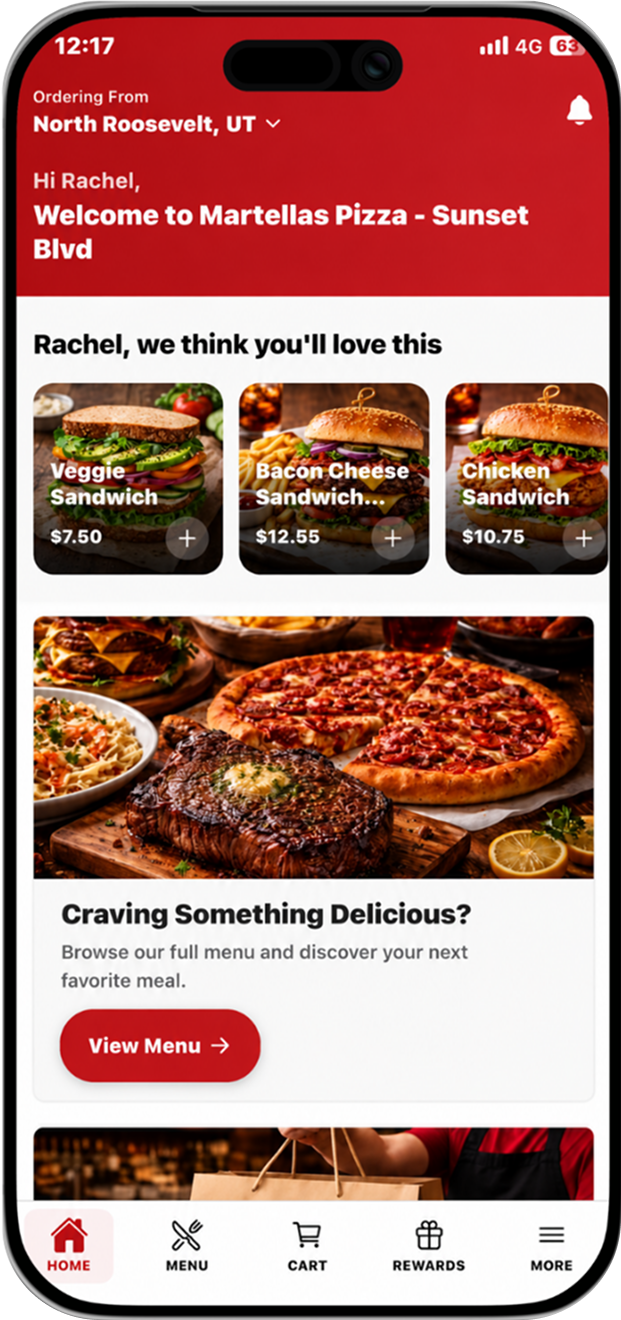
Step 2
The customer can tap on any of the suggested products in the "we think you'll love this" section to instantly add it to their cart, eliminating the need to search or scroll through the menu.
Step 3
The customer can then proceed to checkout and complete payment using their preferred payment method.
The text "we think you'll love this" in the Home Page, can be customized according to business needs.
Related Articles
Product Subscriptions on the Order Ahead App
Product Subscription allows restaurants to offer membership-style plans for specific menu items. Instead of customers buying the same item every time they visit, they can subscribe to a plan and redeem that item during a set time period. Restaurants ...Top Sellers on Order Ahead App
The Top Sellers feature on the Mobile App highlights a restaurant’s most frequently purchased items. This allows customers to quickly identify and order trending products without needing to browse through the entire menu. By automatically showcasing ...Displaying Dynamic Fields on Order Ahead App
Business Dynamic Fields give merchants a flexible way to collect and manage custom information inside the Order Ahead app. Instead of being limited to standard, system-defined fields, merchants can create their own inputs to match their operational ...How to Use OTP-Based Sign-in on Order Ahead App?
The OTP Sign-In feature introduces a secure, password-free login flow where users authenticate themselves through a One-Time Password (OTP) sent via SMS. This feature enhances convenience and security by allowing both existing and new customers to ...How to Delete the Customer Account on the Order Ahead App?
Follow the steps given below to delete the customer account on the Order Ahead App. Once a customer account is deleted, all associated information will be permanently lost and cannot be recovered. Step 1 Tap on the app to open it and click on "Sign ...